
Hotel lobby AI video: put two faces at one mic in the orange booth
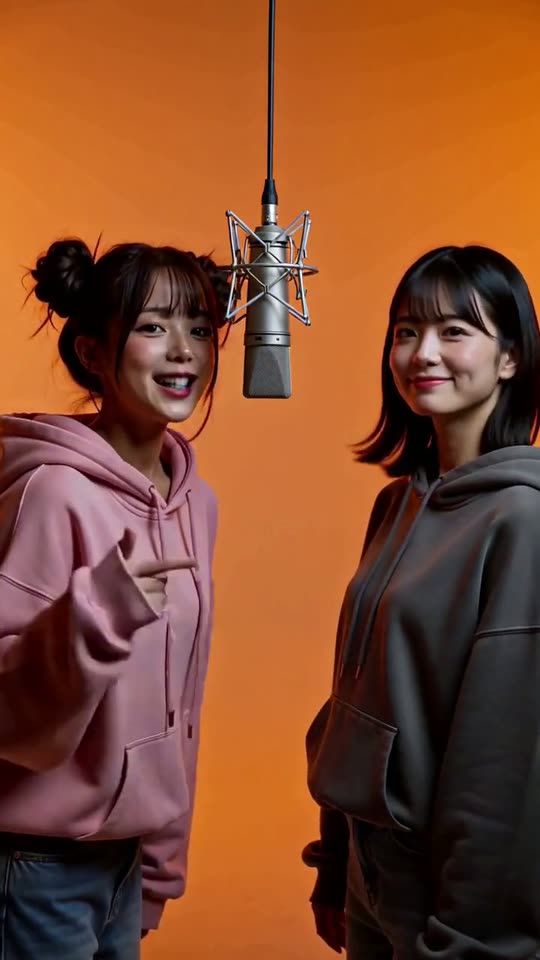
Two photos in, one vertical rap duo out: a left performer, a right performer and a single hanging microphone.
Hotel lobby AI is the clip where two people stand on either side of one microphone in a plain orange studio and trade verses. You add a photo for the left performer and a photo for the right one, and the tool makes a 10-second vertical video with your two faces in it.
One clear, front-facing photo for each person. Each keeps their own face, hair and skin tone; the booth, outfits and mic come from the template.
No nudity, minors or other people's photos without consent — every upload is screened.
Add names or what it's for and we'll write the three lines they rap, in the language you type. Leave the topic empty and it's this site's language. Leave everything empty for the original lines.
A 5-second preview: you trade one line each. The full 10 s duo comes after.
This video: 13 credits · about 23 videos a month for $49.90 on Pro, or $500 a year
No subscription needed · Usually ready in 10-15 minutes · Failed renders are refunded
Orange Booth Rap Duo
Choreography locked · Facial reference enabled
The room in that clip is not a hotel lobby. Hotel Lobby is the name of the song the original performance used, and the set is a bare orange backdrop with a single hanging mic. This page makes the same kind of clip with your faces, without the song.
- Input: two clear photos, one person each. The first goes on the left, the second on the right.
- Output: a 10-second vertical 9:16 video with voices and a beat.
- Price: 13 credits a video, no free tier. The Duo Pack is 50 credits for $29, enough for 3, and pack credits never expire.
What hotel lobby AI actually is
The clip people copy comes from a 2022 studio performance of a song called Hotel Lobby by Quavo and Takeoff. Two performers stood on opposite sides of one hanging microphone against a bright orange wall, one rapping while the other reacted, then switching. In September 2026 people began putting other pairs into that frame with AI, and the first ones that spread were two cats. After that came friends, couples, coworkers and pairs of public figures.
Hotel lobby ai is a format with three fixed parts: the orange backdrop, the single mic, and two performers who take turns. Anything that has those three parts reads as the trend, and anything missing one of them looks like an ordinary two-person video.
Our version builds those three parts and nothing else. It does not use the original song, the original footage, the show's name or either artist's face. The rap lines are made up for the template. That keeps it a clip about you and your friend instead of a copy of somebody else's recording.
Make a hotel lobby AI video in four moves
The order of the two photos matters, so it is worth ten seconds to decide it first.
- 01
Decide who stands where
The first photo goes on the left of the screen, the second on the right. The left performer opens the first verse, so put the person you want to lead there.
- 02
Add both photos
Drop one photo in each slot at the top of the page and tick the box that both people are you or people who agreed, with a parent or guardian agreeing for anyone under 18.
- 03
Press Generate
Sign in with Google when asked; both photos are kept while you do. A duo is 13 credits, and if your balance is short, a payment window opens before anything renders, so you see the price first.
- 04
Collect the full clip
The 10-second render usually takes 10 to 15 minutes and lands in your dashboard. Download the MP4 and post it vertical. If the render fails on our side, its 13 credits are refunded.
Real duos we rendered, pair by pair
The three clips of people below are full 10-second renders from the Orange Booth Rap Duo template on two photos, with no editing; the cat clip is a shorter test cut. The portraits are AI-generated, not real people. Watch them before the notes under them.
What held and what drifted in those three clips
A short log of what we checked on each render, so you know what to expect from yours.
| Check | Result across our renders |
|---|---|
| Each face stays on its own side | Held in the clips below. Nobody swapped sides and no third person appeared. |
| Faces match the photos | Close enough to recognise each person. Fine detail such as freckles softens. |
| Clothes match the photos | Not reliably. In all three clips at least one person came out in different clothes than in their photo, so do not count on a specific outfit. |
| Orange backdrop and one mic | Present in every clip we rendered. The microphone model changed from clip to clip. |
| Turn taking | The left performer rapped first and the right one answered in each clip. Lip sync is good but not frame exact. |
| Voices and beat | Every clip came with voices and a beat, made for the template. It is not the original track. |
Three renders is a small sample. Two runs on the same pair will not match, so read this as a guide to what your own photos might do, not a promise.
Choosing two photos that work together
The model has to read each face on its own before it can stage them side by side, so the pair matters more than either photo.
✓ Do
One person per photo
Use two separate photos, not one group shot cut in half. Each face then has its own reference.
Similar light and framing
Two head-and-shoulders photos in even light read as a pair. A close-up next to a full-length shot tends to produce uneven sizes.
Faces turned to the camera
Front or slightly angled, nothing covering the mouth. The performers turn toward the mic, and a clear face carries through the turn.
✕ Skip
Sunglasses, masks or a hand on the face
Hidden features get invented, and the invention changes from shot to shot.
Two people in one photo
The model picks one of them, and it will not always pick yours.
Pets, cartoons and photos of faces on screens
Real pets work: two cats, a dog, or a pet next to a person, as long as the animal fills the photo. Cartoons, toys and photos of a face on a screen are turned away.
Who makes a hotel lobby AI video
Best friends with opposite energy
The format works on contrast: one calm, one loud. Put the calm one on the left so the first verse starts quietly.
Couples and anniversaries
A ten second duo is an easy thing to send on a birthday or an anniversary, and it needs no filming.
Creators who collaborate
Two creators who have never met in person can post the same clip and tag each other. Both need to agree to their photo being used.
Coworkers and teams
An introduction clip for a new colleague lands better than a plain announcement, as long as the colleague has said yes.
What this will not make
Photos of public figures, photos of people who have died and photos of anyone who has not agreed are not what this tool is for, and the page asks you to confirm both people are you or people who agreed, with a parent or guardian agreeing for anyone under 18. Cartoon characters are not accepted either. Real pets are fine, and the trend did start with two cats.
What one hotel lobby AI video costs
One 10-second duo is 13 credits. There is no free tier and no free preview; credits come from one-time packs or a monthly plan.
| Pack | Credits | Duo videos it covers | Price |
|---|---|---|---|
| Single | 10 | 0 | $9.99 |
| Duo Pack | 50 | 3 | $29 |
| Crew Pack | 350 | 26 | $99 |
| Studio Pack | 900 | 69 | $199 |
| Label Pack | 3000 | 230 | $499 |
The Single pack is 10 credits, short of one duo, so the cheapest way to make one is the Duo Pack. A pack is one payment, not a subscription, and its credits never expire. If a render fails on our side, its credits are refunded.
How the three duo clips were made
Orange Booth Rap Duo template, as rendered for this page.
| Item | Detail |
|---|---|
| Rendered | 1 October 2026 |
| Model and mode | MiniMax H3, reference to video, with both photos sent as references (first photo left, second photo right) |
| Inputs | Two AI-generated portraits per clip, no real people |
| Length and editing | 10 seconds each, full renders, no editing |
| Wait in the queue | About 10 to 15 minutes per clip in our runs |
| What the test cost us | About US$0.60 in total for the renders and the portraits |
Numbers come from our own test runs on the dates shown. Your wait and result will differ.
Questions about hotel lobby AI
What is the hotel lobby AI trend?
It is a video format where two people stand on opposite sides of one hanging microphone in a plain orange studio and trade verses, one rapping while the other reacts. The frame comes from a 2022 studio performance of a song called Hotel Lobby. In September 2026 people started dropping their own pairs into it with AI, first two cats and then friends, couples and coworkers. The room is not actually a hotel lobby, which surprises a lot of people searching for it. The name belongs to the song, and what everyone is copying is the orange booth, the single mic and the back and forth between the two performers.
How do I make a hotel lobby AI video?
Add one photo for the left performer and one for the right in the tool at the top of this page, then tick the box that both people are you or people who agreed, with a parent or guardian agreeing for anyone under 18. Generating asks you to sign in with Google, and your photos are kept while you do. A duo costs 13 credits; if your balance is short, Generate opens a payment window before anything renders. The 10-second video then lands in your dashboard as an MP4 you can download and post. There is nothing to install and nothing to prompt, because the format is fixed.
Is hotel lobby AI free?
No. There is no free tier, free preview or sign-up credit here: every 10-second duo costs 13 credits, and you see that before it renders. The Single pack ($9.99) holds 10 credits, not enough for one duo, so the cheapest way to make one is the Duo Pack: 50 credits for $29, enough for 3. Packs are single payments, not subscriptions, and their credits never expire. If a render fails on our side, its credits are refunded. Other sites advertise hotel lobby ai free and then charge when you press generate, so check the price before you upload.
Which photo goes on the left and which on the right?
The first photo you add goes on the left of the screen and the second on the right. The left performer opens the first verse while the right one nods along, then they swap, so put the person who should lead on the left. If a clip comes out with the wrong person leading, add the same two photos in the opposite order and render again. We have not seen the model swap two faces between sides in our own renders, but it is the most common thing people report with other tools, so check the first seconds before you share.
Can I use my cat, my dog or a cartoon character?
Your cat or dog, yes; a cartoon character, no. The first hotel lobby ai clips that spread used two cats, and since October 2026 this template takes a clear photo of a real pet for either side: two cats, two dogs, or a person on one side and a pet on the other. The pet keeps its own fur and markings and does the rapping and nodding in its place at the mic. Use a photo where the animal fills most of the frame, facing the camera. Cartoons, toys, plush animals and photos of a face on a screen are still turned away, because there is no real face to keep.
Does it use the original song or the original video?
No. The clip uses made-up rap lines, a beat and voices generated for the template, and an orange backdrop and a mic that we build ourselves. It does not use the original recording, the original footage, the name of the show or the face of either artist. It is the same kind of clip with your two faces, not a copy of theirs, and it is not connected to or endorsed by the original performers. That also means no recognised music sits in your clip, so a platform that mutes or flags copyrighted audio has nothing to match.
Why do the clothes change even though the faces stay the same?
Because the photos pin who is on screen, not what they wear. The model keeps each face as a likeness and then dresses and lights the people to suit the orange booth, so a cardigan in your photo can come out as a hoodie, as one of our own renders did. If a particular outfit matters, budget for a second render, because the photo cannot pin the clothes, and check the first seconds before you share. Clothes are the part that drifts most; faces drift least.
Can I post it on TikTok, Reels or Shorts?
Yes, it is a vertical 9:16 MP4 you can post anywhere vertical video is accepted. Two cautions: both people must have agreed to their face being used, and several platforms ask you to label AI-generated content, so turn that label on when you post. The clip has no copyrighted audio from the original performance, which also avoids the audio muting that some platforms apply to music they recognise. Download the file from your dashboard, keep it vertical rather than cropping it, and add your own caption naming the other person so the pairing reads as a joke between the two of you instead of a mystery clip.
Ready to try it?
Add a photo in the tool at the top of this page. Nothing is charged until you press a paid button, and the price is on the button.
Back to the tool